
MacBook & iMac repair
Won’t turn on, screen, battery, keyboard, liquid damage, SSD and RAM upgrades.
Desktop Mac · 2012–2020
It is the iMac most people still use at home and in the studio, and also the one with the worst reputation, for a reason that actually has a fix.
4,6 out of 5 · 138 reviews on GoogleRepair quirk
Since 2012, the iMac’s glass stopped being held by magnets and started being bonded to the chassis with adhesive strips all the way around. To touch anything inside, that adhesive has to be cut, and it is not reusable: a fresh set goes on at closing. It is a job for the right tool and a steady hand, not a screwdriver.
There is an exception many people do not know about: the 27-inch iMac has a memory access door on the back, just above the power connector. A button opens it, and it lets you add RAM without touching the display. The 21.5-inch iMacs do not have one, and there the panel really does have to come off.
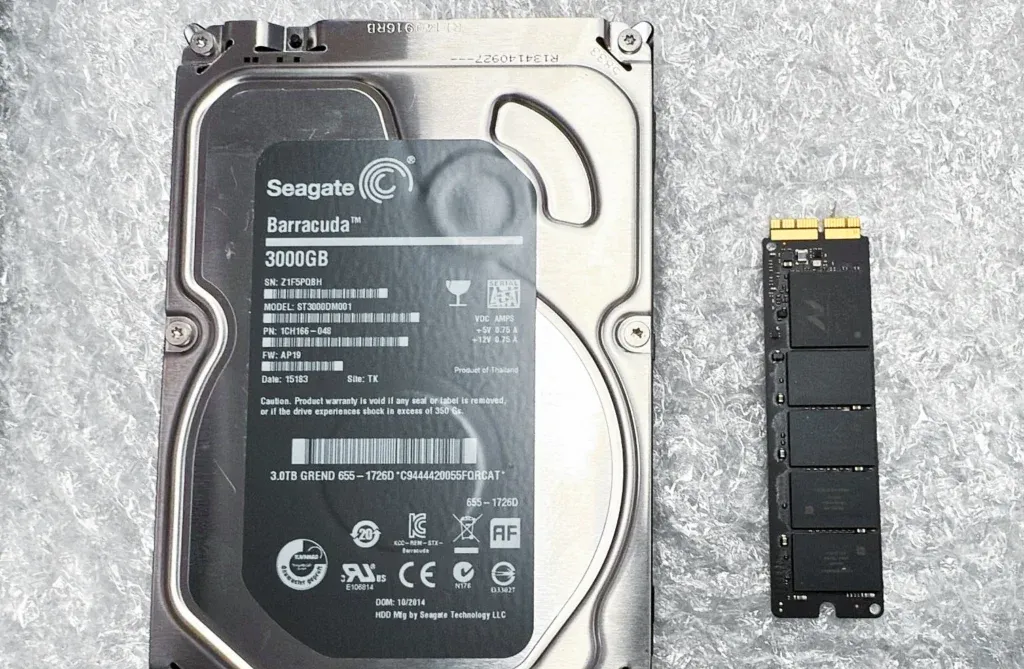
The second upgrade is the one that changes the machine’s life: replacing the spinning drive, or the slow half of a Fusion Drive, with an SSD. An iMac that takes two minutes to reach the desktop usually does not have an old processor; it has a 2013 platter drive that today’s operating system asks far more of than it can give.
The classic symptom of a spinning drive under a modern system. Swapping it for an SSD is the single most noticeable repair there is.
That rhythmic noise is mechanical and does not heal itself. Switch it off and bring it in: every boot from now on cuts the odds of getting the files back.
Colour bands, dead zones or dust trapped behind the glass. All of that means opening the panel, which is why it gets done in one go with everything else.
On the 27-inch it goes in through the back door. If what bothers you is sluggishness with many apps open, it is the simplest job available here.
Opening an iMac means buying fresh strips to close it properly again. That is why it pays to bundle everything you want done inside into one opening.
This page digs into one specific model. If you want the full picture of what we do with this family of devices, start here:
Won’t turn on, screen, battery, keyboard, liquid damage, SSD and RAM upgrades.
Its memory sits in sockets and can be upgraded on the bench, which no later Mac mini allows.
With the T2 the SSD is soldered and encrypted, and Apple dropped the port that rescued data.
Yes, the system and your files move to the new drive. If the current drive is already throwing errors, the copy is the first thing done, and we tell you if its condition makes that uncertain.
It depends on the exact year of your unit, so it gets checked before anything is bought. What they all share is that it goes in through the back door, with the display left alone.
Yes, as long as it goes back together with new adhesive strips, which is how it is done here. Reusing the old adhesive is what leaves the panel loose and lets dust in at the edges.
Tell us what’s wrong and we’ll tell you what it is, what it costs and how long it takes. No obligation, and the initial diagnosis is free.
4,6 out of 5 · 138 reviews on GoogleCarrer de Fontanella, 14, bajos · 08010 Barcelona — or drop by Fontanella 14, next to Plaça Catalunya