
6 min read
Your phone got wet: what to do (and not do) in the first hour
What you do in the first sixty minutes decides most of what follows. And almost everything the internet says about rice is wrong.
8 min readBestFixing workshop team
An abrupt shutdown under load is almost never a Windows problem. They are three different faults sharing one symptom, and they can be told apart before opening the machine.
The machine runs perfectly for half an hour. Then, in the middle of a match or an export, it cuts out cold: no warning, no blue screen, as though somebody pulled the cable. A while later it boots again quite happily.
That symptom is one of the most common on high-end laptops — MSI, Legion, ROG, Victus, Omen, Alienware, Predator — and it has three very different possible causes. It is worth separating them before spending a euro, because the fix for one does nothing for the other two.
First of all, to take the drama out of it and put some precision in.
When a computer shuts down cold without closing anything, a safety mechanism has almost always acted. The processor has an absolute thermal limit and, on reaching it, cuts the power rather than carrying on. The power circuit has the same: if a voltage sags below a threshold, everything switches off instead of running badly.
So the shutdown is telling you something has gone out of range. The useful question is not “why does it shut down” but what went out of range. And there are only three answers.
This is the most common one and the most rewarding, because it nearly always has a fix.
A gaming laptop packs the power draw of a desktop into three centimetres of thickness. The whole system depends on heat travelling from the chips out to some tiny radiators, and that journey degrades in three ways at once:
The sign that confirms this cause is a progressive climb before the cut: the fans spool up, performance drops, the chassis gets hot and then it shuts down. If you have a temperature monitor, you will watch the curve rise. If the cut is instant and the machine is lukewarm, this is not your cause.
This is the one almost nobody looks at, and on laptops more than three or four years old it is very common.
Modern gaming laptops run on hybrid power. When the CPU and the graphics chip together ask for more than the charger delivers, the machine makes up the difference by pulling from the battery, even while plugged in. That is not a fault: the manufacturers themselves document it as intended behaviour, and it is what allows more manageable chargers without giving up performance.
The problem shows up as that battery ages. An old cell loses capacity, but above all it loses the ability to deliver current in a burst. And then this happens: the machine holds up perfectly on the desktop and shuts down the instant the first serious peak arrives. With the battery at 100 %, plugged in, and with no temperature rise at all.
The same thing happens by another route if the charger isn’t the right one. A brick with less power than the original fits and charges, but it won’t hold the peak. And an original charger that’s already old can have lost part of what it used to deliver, with nothing on the outside to give it away.
Three things that point at this cause:
If on top of that you notice the machine only runs with the charger attached, or that it has stopped charging altogether, the starting point is a different one and it is at a laptop showing no signs of life.
When the cooling is fine and the external power is fine too, what is left is the circuit that distributes current inside the machine.
The CPU and the graphics chip are not fed directly from the charger’s 19 volts: there are conversion stages on the board — transistors, coils, capacitors and a controller — that step that voltage down and hold it steady while the draw changes a thousand times a second. Those stages run hot and are among the first things to age in a laptop that has gamed hard.
When one of them starts to fail the symptom is exactly the same: the machine holds the desktop, asks for a current peak and the voltage sags just enough for the protection to trip. It also appears through corrosion, a fatigued joint under a chip or a coil that has lost contact.
None of that needs a whole replacement board if it can be avoided: the component is located and that point is rebuilt. It is what the microsoldering lab is for, and on a PC laptop it is more comfortable work than on a Mac, because there is more space between components and schematics circulate with less secrecy.
An important note before anybody opens your laptop.
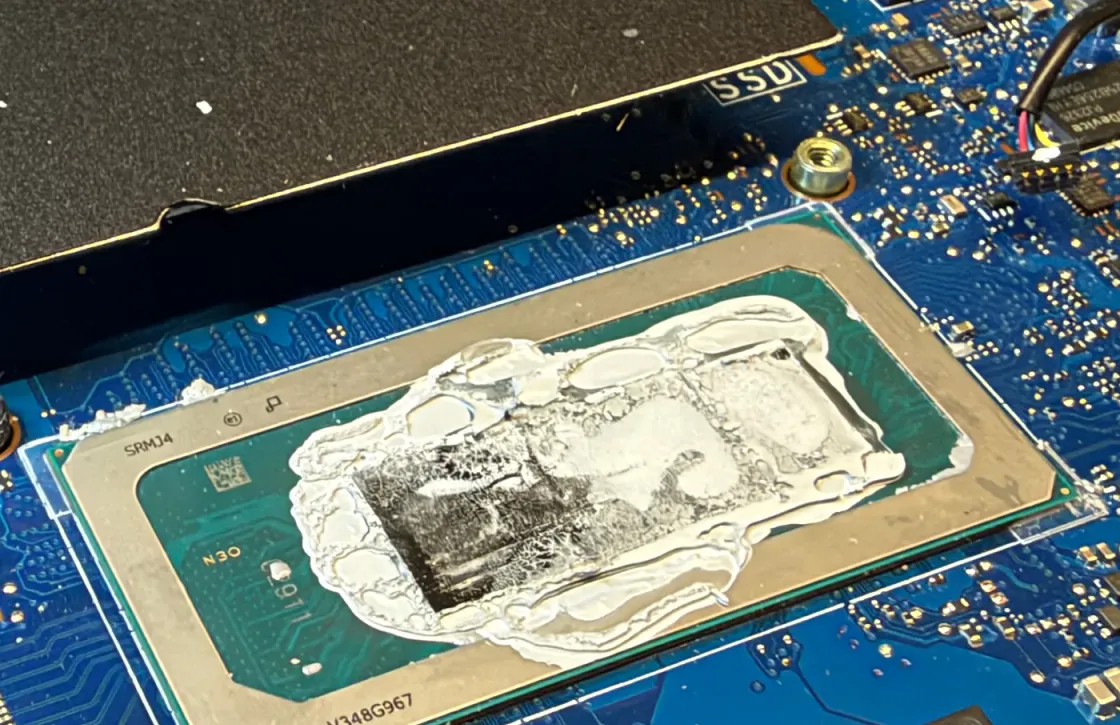
Part of the recent gaming range — ASUS documents this openly on its own support site — does not use thermal paste on the processor but liquid metal: an alloy with far higher thermal conductivity. It is held in place by a barrier that stops it escaping.
What you need to know is that the compound conducts electricity. The manufacturer warns about it without hedging: if a droplet reaches components on the board, it can cause a short circuit. It also attacks aluminium, so not just any heatsink or any procedure will do.
Translated: a strip-down done without knowing that machine uses liquid metal, or a paste change made with the best intentions and the wrong material, turns routine maintenance into a board fault. That is not a reason to leave it unopened; it is a reason for whoever opens it to know beforehand what they are going to find.
The order we follow, in case you want to know what will happen to the machine.
First the shutdown is reproduced with the machine instrumented: CPU and graphics temperatures, real draw at the input, and battery behaviour as the load climbs. That alone separates the thermal scenario from the electrical one without opening anything, because a temperature curve rising until the cut and a voltage sagging on a cold machine look nothing alike.
If it is thermal, the whole cooling system comes off, the radiators are cleaned, the compound appropriate to that specific model is renewed and the pads are replaced. If it is electrical, the machine goes to the board bench: the sagging power stage is measured and the component located. And if what no longer measures up is the charger or the battery, we say exactly that, because it is the simplest of the three repairs and it would be absurd to charge you for a larger one.
We tell you what it has and what it costs before you authorise anything, and what we do carries a 12-month warranty on parts and labour. How we handle a Windows laptop or an Android phone is covered separately, the rest of the workshop guides come off the same bench, the full route is on how the process works, and if you would rather start by telling us exactly when it shuts down, write to us.
BestFixing workshop team
We are the workshop team at BestFixing, in Carrer de Fontanella, 14, bajos · 08010 Barcelona. We have been repairing Apple devices since 2015 and more than 2,300 machines have been through our bench.
What we write here comes from what we see every day: we have our own microsoldering lab and repair the board at chip level rather than replacing it, and we do data recovery in the workshop itself, without the machine ever leaving. Every repair leaves with a written 12-month warranty on the part and on the labour.
6 min read
What you do in the first sixty minutes decides most of what follows. And almost everything the internet says about rice is wrong.
6 min read
On a laptop the keyboard is a funnel straight down to the logic board, so liquid reaches the electronics in seconds. That first minute counts for more than everything else.
7 min read
A Mac that will not turn on can mean five different things, and each one leads to a different repair. These checks take ten minutes and sometimes solve the problem outright.
It fixes the thermal ones, which are many, but not all of them. If the machine shuts down with temperatures under control, or cuts out abruptly with no rise beforehand, the problem is in the power circuit or on the board and paste changes nothing. Which is why we measure first and open afterwards.
On a good number of gaming laptops it is, and the manufacturers document it: when momentary draw exceeds what the charger delivers, the machine makes up the difference from the battery so as not to lose performance. It stops being normal once the battery has aged and can no longer supply that extra, because then the voltage sags and the machine cuts out.
Not while it stays where it belongs. It conducts electricity, so a strip-down done without knowing that a machine uses it can end with a stray droplet and a shorted board. What matters is that whoever opens it knows in advance which compound it uses and works accordingly.
For browsing and working, usually yes. For gaming or rendering, better not: every abrupt shutdown is a power cut with nothing closed cleanly, and that is where corrupt file systems and half-saved projects come from. If the machine smells of burning or shuts down while idle too, stop switching it on.
Logic board repair at chip level: no power, no charge, no image, boot loop.
Tell us what’s wrong and we’ll tell you what it is, what it costs and how long it takes. No obligation, and the initial diagnosis is free.
4,6 out of 5 · 138 reviews on GoogleCarrer de Fontanella, 14, bajos · 08010 Barcelona — or drop by Fontanella 14, next to Plaça Catalunya