
6 min read
Your phone got wet: what to do (and not do) in the first hour
What you do in the first sixty minutes decides most of what follows. And almost everything the internet says about rice is wrong.
8 min readBestFixing workshop team
A machine that ignores the power button is not a wrecked machine. It is a start-up sequence that has stopped at one specific step, and that step is found by measuring.
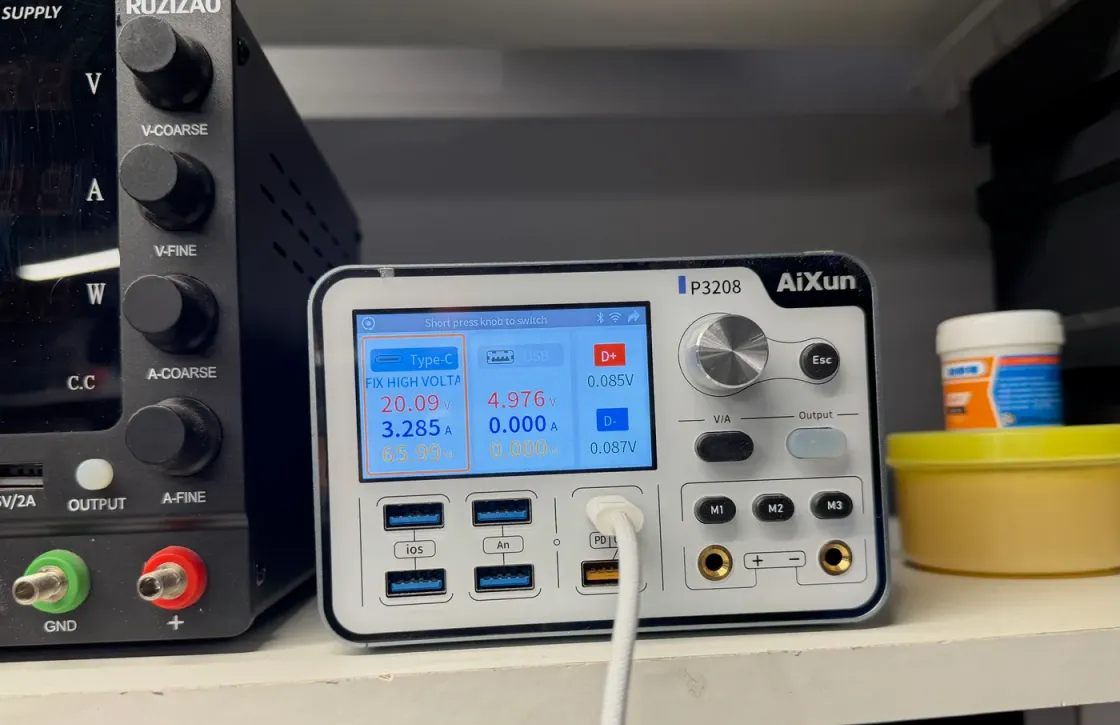
A laptop that gives no sign of life is not a laptop that is vaguely broken inside. It is a sequence that has stopped at one exact point, and finding that point is half the job. The other half is not having made it worse before it arrives.
This guide is about Windows laptops — Lenovo, HP, Asus, Dell, Acer, MSI and company — which are most of what comes through this door. If yours is a Mac, the route is similar but the details change, and they are at the checks for a Mac that will not turn on.
Before anything else, sharpen the symptom. Each answer leads somewhere different, and it is the single detail that shortens the diagnosis most:
Note down which one is yours. If the machine always shuts down after a while gaming or rendering, rather than when you press the button, you are not in this article: you are in a gaming laptop that shuts down under load.
It helps to understand this, because it explains how a machine can be completely mute and still have a small fault.
The moment you plug the charger in — before you touch anything — an input circuit accepts that voltage and generates two permanent rails, 3.3 and 5 volts, which are alive even with the laptop switched off. Those two rails feed the embedded controller, a small microcontroller that acts as the doorman of the board. It is the only thing awake.
The power button feeds nothing. It only sends that doorman a signal. The doorman checks the conditions are right and then brings up the remaining voltages in a strict order: some first, others after, and only when every one of them answers does it release the processor to boot.
If a single one of those voltages is missing, arrives late or is shorted to ground, the sequence stops at that step and the machine stays exactly as it was: mute, cold and undramatic. Which is why an inert laptop does not mean a wrecked laptop. Very often it is a one-millimetre component on one particular rail.
This is the dull part and the one that turns out to be right most often. “I already tried another charger” does not count if that other charger is not a known good one.
That last point isn’t theoretical: on a laptop with a plastic lid, the video cable ends up breaking in the same place everything else breaks, the hinge. If the lid has started to creak when you open it, if it has gone stiff, or if the plastic at the corner has cracked, get it looked at before the cable pays for it.
At this point it is the board, and it is worth knowing what gets looked for, because it shapes the conversation you will have at the counter.
None of this is diagnosed by swapping parts and hoping. It is measured: cold current draw on a bench supply, a thermal camera to see which component heats up when it should not, and the failing rail followed to the exact point. That is the work we do in microsoldering and logic board repair.
This is the ground where one workshop separates from another most clearly, and it is worth saying plainly.
A service that works by modules has only one possible answer for a machine that will not turn on: replace the whole board. That is a legitimate answer and sometimes it is the right one. The problem is that on a laptop the board is usually the most expensive part inside, and on a machine a few years old the quote gets uncomfortably close to what the thing is worth second hand.
Working at component level changes the question. It is not “how much is a new board?” but “which specific point on this board stopped working, and can it be rebuilt?”. On a PC laptop that conversation is more comfortable than on a Mac: there is more space between components, schematics circulate with less secrecy and component-level spares are easy to source. How that fits with what we do every day is on PC and Android repair.
When the numbers don’t add up, we’ll tell you with the figures in front of you. We won’t say yes to a repair that costs nearly as much as the machine just because we can do it, and what moves the price of each fault is explained separately.
Say so the moment you walk in, ahead of anything else. It changes the order of the entire job: the goal stops being a perfect machine and becomes reading the drive.
The good news is that on most Windows laptops the storage sits on a separate M.2 module, so it comes out and gets read without depending on the board coming back to life. That turns into a formality what on a recent Mac is a compulsory board repair, because there the SSD is soldered and encrypted against the processor. The way we work is on data recovery, and if what you have is an external drive that has started making noise, stop before you go any further and read a hard drive that clicks.
One detail worth keeping in mind: if the drive has BitLocker enabled — increasingly common on Windows 11 laptops — you will need the recovery key from your Microsoft account to open it outside the machine. Find it before you set off.
We look at the laptop, measure it and tell you what it has and what it costs before you authorise anything; what we do carries a 12-month warranty on parts and labour. The process end to end is on how the process works, and if you would rather start by telling us exactly what happens when you press the button, write to us.
BestFixing workshop team
We are the workshop team at BestFixing, in Carrer de Fontanella, 14, bajos · 08010 Barcelona. We have been repairing Apple devices since 2015 and more than 2,300 machines have been through our bench.
What we write here comes from what we see every day: we have our own microsoldering lab and repair the board at chip level rather than replacing it, and we do data recovery in the workshop itself, without the machine ever leaving. Every repair leaves with a written 12-month warranty on the part and on the labour.
6 min read
What you do in the first sixty minutes decides most of what follows. And almost everything the internet says about rice is wrong.
6 min read
On a laptop the keyboard is a funnel straight down to the logic board, so liquid reaches the electronics in seconds. That first minute counts for more than everything else.
7 min read
A Mac that will not turn on can mean five different things, and each one leads to a different repair. These checks take ten minutes and sometimes solve the problem outright.
Not necessarily, and it is one of the diagnoses that surprises people most. A completely inert machine usually has a single supply rail down or shorted, and that point is found by measuring the board under a microscope. The silent fault is not the serious one: the serious one is the fault that burns, smells and leaves a mark.
There is, and it is worth doing properly: charger unplugged and, if the machine allows it, battery disconnected too. That drains the capacitors and forces the embedded controller to restart. It does not fix a physical fault, but it does unstick a machine that is simply hung, which happens more often than you would think.
It means voltage is reaching the input circuit and something is managing it, which is already useful information. It does not mean the rest of the sequence works: between that first voltage and the processor booting there are several more steps, and the machine sits inert if any one of them fails.
On most Windows laptops no, and that is a big difference from recent Macs. The storage usually sits on a separate module that can be read without the board. Say so the moment you walk in anyway, because it changes the order of the work: data first, machine afterwards.
Logic board repair at chip level: no power, no charge, no image, boot loop.
Photos and documents from dead devices, damaged drives or accidental deletion.
Tell us what’s wrong and we’ll tell you what it is, what it costs and how long it takes. No obligation, and the initial diagnosis is free.
4,6 out of 5 · 138 reviews on GoogleCarrer de Fontanella, 14, bajos · 08010 Barcelona — or drop by Fontanella 14, next to Plaça Catalunya